Anyone who has used an AI agent for real work knows the drill. It wants to read a folder — approve. It wants to reach a website — approve. It wants to run a command — approve. By the tenth prompt, the "Always Allow" button looks very attractive.
Don't click it.
The approval prompt is the one moment where you, the human, see what the agent is about to do before it does it. That's true whether you run a ten-person business or you're protecting your own household's accounts. Approving access one request at a time is slower. Recovering after a hijacked agent has already acted on your behalf is much slower — and we'll do the honest math on that below.
The target has moved
Where it hits: The flaw is in the AI agent on a staff member's computer, which follows instructions hidden in an email, issue or document it reads, and the harm lands in the mailboxes, code hosts and cloud accounts it was given, whose private files and messages it can send out.
Can be addressed by:
- Depends on the setup: An AI prompt firewall can score prompts and, in some products, the documents and tool results an agent reads, but it gives a likelihood rather than a verdict, so it helps only after one leg of the trifecta is cut and only if it is set to check what the agent reads.
- Depends on the setup: A cloud app security broker or web gateway can block or limit which AI apps staff use and keep sensitive data out of prompts, but most of their prompt checks see only what is sent, not instructions hidden in what an agent reads.
Each vendor, kind by kind, is under What security tools already have for this.
For twenty years, attackers went after the person: phish the password, then trick the user into approving an MFA prompt, steal the session after login, or hijack the phone number the codes go to. MFA itself rarely breaks — attackers go around it. That still works. But an AI agent with access to your files, your inbox and your browser is a better target. It doesn't get suspicious, it doesn't take lunch, and it follows instructions — including instructions it was never supposed to receive.
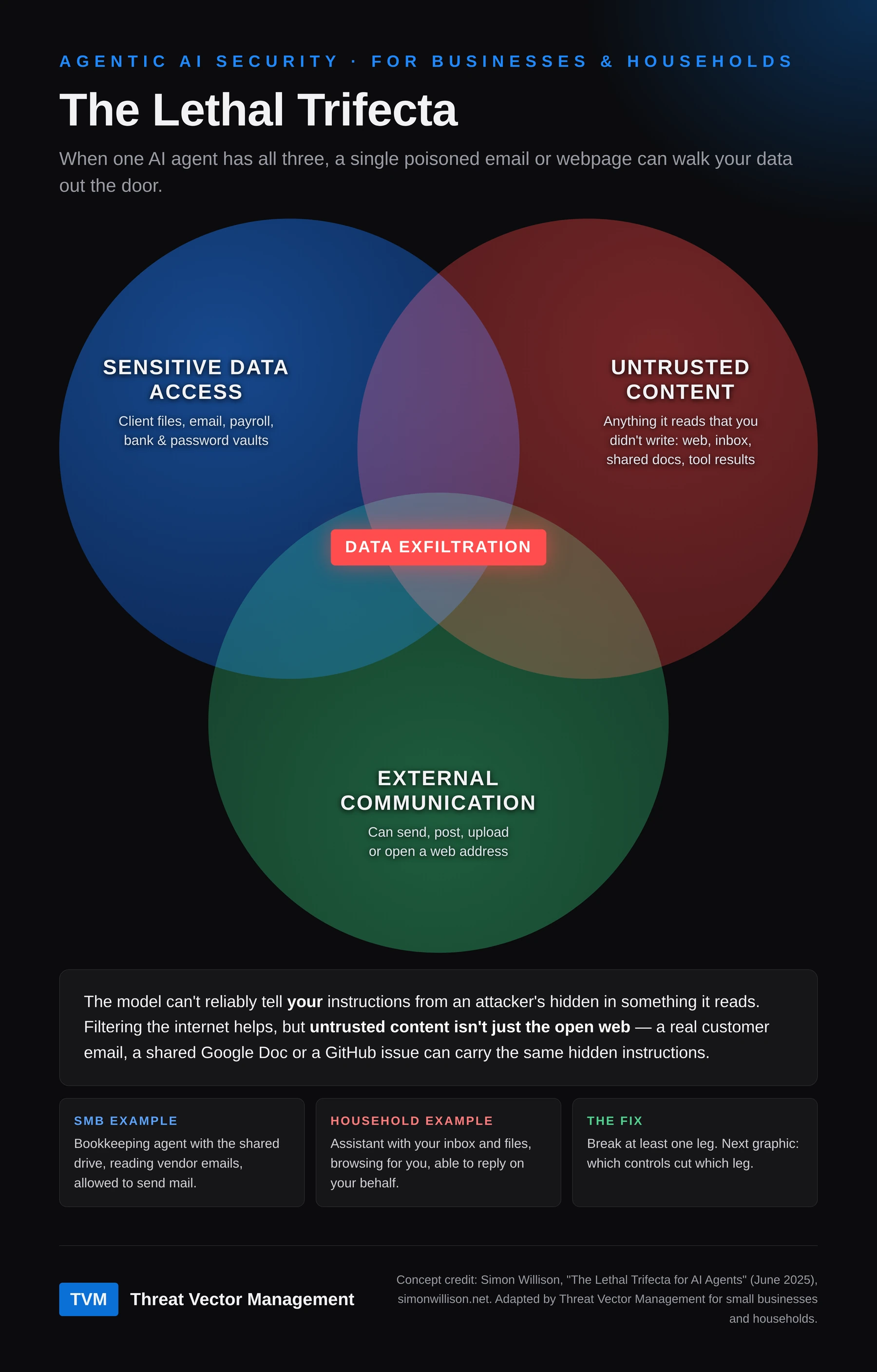
Security researcher Simon Willison named the core problem the lethal trifecta. An agent that has all three of these can be tricked into handing your data to an attacker:
- Sensitive data access — client files, email, payroll, bank and password vaults.
- Untrusted content — anything the agent reads that you didn't write yourself.
- External communication — the ability to send, post, upload or open a web address.
The catch is in number two. It's tempting to read "untrusted content" as "the open internet," and DNS filtering and web filtering do help. But a real customer's email, a shared Google Doc, a calendar invite or a GitHub issue are all untrusted content too — and all of them have been used to carry hidden instructions. The model can't reliably tell your instructions apart from an attacker's hidden in something it reads. In Willison's words: "we still don't know how to 100% reliably prevent this from happening."
What that looks like in practice:
- Small business: a bookkeeping agent with access to the shared drive, reading vendor emails, allowed to send mail.
- Household: an assistant with your inbox and files, browsing for you, able to reply on your behalf.
Both have all three legs. Both are one poisoned message away from a leak.
Framework mapping: OWASP Top 10 for Agentic Applications — ASI01 Agent Goal Hijack, ASI02 Tool Misuse.
Each stage is paired with the indicators the researchers published for it, from two public cases: a GitHub issue that hijacked a coding agent (Invariant Labs, May 2025) and an email that hijacked Microsoft 365 Copilot (Aim Labs, June 2025).
- Not evidence of harm
- Attacker code ran, or attacker activity
- Data stolen or device targeted
- Stage 0The agent holds all three legs
The agent can read private data, reads content that other people can write, and can send, post or load something outside. Simon Willison calls this combination the lethal trifecta.
Exposure, not harm"Always Allow" confirmation policyInvariant Labs: many users choose it and stop watching each actionone agent connected to a public repository and private repositoriesInvariant Labs' test setup
This stage says only that the agent could be tricked; nothing has happened yet.
- Stage 1Planted instructions arrive in something the agent will read
The attacker writes where anyone can write: an issue in a public repository, or an email to anyone in the company. Aim Labs wrote its email as if the instructions were for the human reader, so Microsoft's prompt injection classifiers did not flag it.
Attacker activity reached the agent's reading listmalicious issue in a public repositoryInvariant Labs, GitHub MCPoutside email whose instructions are aimed at the recipient and never mention AI or CopilotAim Labs, EchoLeak
Invariant Labs says many off-the-shelf prompt injection detectors fail to catch this attack, so a clean scan at this stage proves little.
- Stage 2The agent reaches for data the task did not need
Asked only to look at open issues, Invariant's agent pulled data from the owner's private repositories into its context. Aim Labs calls the same move in Copilot an LLM scope violation: outside text makes the AI reach for trusted data without the user's consent.
The agent is following the attacker's instructionstool calls to a second repository in the same sessionthe pattern Invariant's example policy blocks (one repository per session)outside email that refers to internal data beyond its own scopeAim Labs, LLM scope violation
- Stage 3The data leaves through a channel the agent was allowed to use
Invariant's agent wrote the private data into a new pull request in the public repository. In EchoLeak, Copilot wrote a reference-style markdown image whose address carried the data, and the browser fetched it with no click, through a Microsoft Teams address the page already trusted.
Data left the devicepull request in a public repository carrying private repository detailsInvariant Labs![Image alt text][ref]Aim Labs: a reference-style markdown image, which Copilot's external link redaction missedeu-prod.asyncgw.teams.microsoft[.]com/urlp/v1/url/content?url=Aim Labs: the Teams address that passed the data out
Microsoft fixed EchoLeak on its own servers, so the Copilot addresses show how the trick worked, not a live threat; the pattern itself has no patch.
- Stage 1
If you see: an issue, email or document that gives instructions unrelated to its subject, even if it never mentions AI.
Where: public repository issues, the shared inbox, and any place outsiders can write that the agent reads.
It means: someone may be planting instructions for the agent; Aim Labs' email was written to its human reader so that classifiers would miss it.
Then do: do not ask the agent to read, summarize or act on it, remove or quarantine it, and check whether the agent has already read it.
- Stage 2
If you see: the agent asks for, or opens, a repository, folder, mailbox or file that the task you gave it did not need.
Where: the agent's approval prompts and activity list, and the access log of the connected service.
It means: the agent may be following someone else's instructions; Invariant's agent was asked about public issues and went into private repositories.
Then do: answer no, stop the session, and find the item it read just before the request.
- Stage 3
If you see: a new pull request, post or reply the agent made that holds private details, or an answer that shows an image or link to an outside address.
Where: the public repository, the thread or ticket, and web proxy or DNS logs.
It means: data has probably left, so treat whatever it held as exposed.
Then do: delete the post, replace any password or key it contained, tell the people whose data it was, and take away the agent's ability to send or post until one leg of the trifecta is cut.
What security tools already have for this
Every prompt firewall gives a likelihood, not a verdict: Microsoft calls its own a probabilistic classifier, and Simon Willison warns that catching 95% of attacks is a failing grade. Cut one leg of the trifecta first, then add a firewall.
AI prompt firewall
Depends on the setup: An AI prompt firewall can score prompts and, in some products, the documents and tool results an agent reads, but it gives a likelihood rather than a verdict, so it helps only after one leg of the trifecta is cut and only if it is set to check what the agent reads.
| Vendor | What they have published | Status |
|---|---|---|
| Cloudflare | AI Security for Apps scans incoming requests to an AI endpoint you label cf-llm and gives each prompt an injection score; Cloudflare suggests starting with a Log action and moving to Block once you trust the score. Its pages describe scanning only what is sent to the organization's own AI app, not the emails, documents or tool results an agent reads later. | Published: covers prompts typed into the organization's own AI app, not what an agent reads |
| Akamai | Firewall for AI, offered in limited availability, checks prompt entries sent to an AI app and checks the app's output for data leakage. Its pages describe only prompts that users enter, not instructions hidden in documents or tool results. | Published: prompts and answers only |
| Palo Alto Networks | Prisma AIRS AI Runtime Security can check the inputs and outputs of Model Context Protocol (MCP) tools for prompt injection. Turn on Prompt Injection Detection in an API security profile and set it to Alert first, then Block; turn on Sensitive Data Detection to check prompts and responses for leaked data. It sees only what the application sends to its scan service. | Published: switch on Prompt Injection Detection |
| Microsoft | Prompt Shields in Azure AI Content Safety has a separate document attack check for instructions hidden in documents and other content the AI reads. It is off by default and must be turned on in the guardrail settings; for agents it can also scan tool responses (in preview). Microsoft calls Prompt Shields a probabilistic classifier and pairs it with blocking of known ways to send data out. | Published: turn on document attack detection |
| Check Point | Lakera, which Check Point agreed to buy on 16 September 2025, documents a Prompt Defense guardrail for direct and indirect attacks, including content an agent reads such as tool responses, if the app passes that content to its Guard API. Detect mode only logs; Enforce mode blocks or warns the user. A separate guardrail screens inputs and outputs for personal data. | Published: run in Detect mode first, then Enforce |
| F5 | F5 says F5 AI Guardrails, released after it bought CalypsoAI, detects and blocks hidden instructions embedded in data consumed by agents and inspects prompts, responses and agent tool actions. We found these claims in F5's blog, not in a setup guide, so we cannot say which setting turns the check on. | Published: described by F5; no setup guide found (checked 18 Nov) |
Cloud app security broker (CASB) and secure web gateway
Depends on the setup: A cloud app security broker or web gateway can block or limit which AI apps staff use and keep sensitive data out of prompts, but most of their prompt checks see only what is sent, not instructions hidden in what an agent reads.
| Vendor | What they have published | Status |
|---|---|---|
| Netskope | Netskope can identify more than 3,300 generative AI apps to control their use. Its AI Guardrails profile has a Prompt Injection and Jailbreaking switch that checks only prompts sent to the AI app, not what comes back. Its MCP policies can control traffic between AI agents and MCP servers, need extra licenses, and do not see traffic that skips SSL decryption. | Published: the prompt check covers only what is sent; agent traffic needs an add-on |
| Zscaler | Zscaler can block AI apps or allow them only through browser isolation, and its SSL decryption lets it see what users post to ChatGPT. Its AI Guard product blocks prompt injections and jailbreaks, and Zscaler's AI Guard for Apps page describes catching a malicious link planted through indirect prompt injection in a response. Zscaler announced an AI Broker for agent traffic on 9 June 2026. | Published: block or isolate unapproved AI; AI Guard is a separate product |
| Palo Alto Prisma Access | AI Access Security lets you allow or block AI apps by user group and attach an Enterprise Data Loss Prevention profile to the rule so sensitive data does not go into prompts. Checking for prompt injection is the separate Prisma AIRS product in the row above. | Published: controls staff use of AI apps only |
| Microsoft Defender for Cloud Apps | Filter the app catalog to Generative AI and mark an app Unsanctioned; it is then blocked only on devices onboarded to Defender for Endpoint. Microsoft's blocking check for prompt injection is in a different product, Entra Internet Access, which needs TLS inspection and checks text prompts only, not files. | Published: blocks unapproved AI apps; no prompt injection check in this product |
Web application firewalls appear here only through their AI prompt firewall features, and intrusion prevention, DNS filtering, endpoint detection and vulnerability scanners are left out, because the planted instruction is ordinary text rather than malware, a known-bad address or an unpatched flaw.
Vendors that blocked our reader for this post: none recorded. We began recording this on 19 November 2026, after this post was researched.
This is not theoretical
Where it hits: The flaw is in a package or add-on pulled into the organization's own code and tools, which ran the developer's AI tools or copied mail, and the harm lands on the developer's computer, its keys and wallets, and the email service every message passed through.
Can be addressed by:
- A package firewall can stop a known malicious package or add-on before it is installed, which is the only point in these attacks where a control acts before the code runs.
- Only after a break-in: Endpoint detection can spot AI coding tools started with their permission checks turned off or scanning for keys and wallets, but only once the malicious script is already running on the developer's computer.
Each vendor, kind by kind, is under What security tools already have for this.
Every one of these happened:
- May 2025 — GitHub MCP server. Invariant Labs showed a malicious issue in a public repository could hijack a developer's agent into pulling data from their private repositories and publishing it. Their note on the root cause: many users "already opt for an 'Always Allow' confirmation policy when using agents, and stop monitoring individual actions."
- June 2025 — Microsoft 365 Copilot "EchoLeak" (CVE-2025-32711): Aim Security showed a single crafted email could lead Copilot to exfiltrate internal data with no click from the user. Microsoft fixed it server-side.
- August 2025 — Nx "s1ngularity" supply-chain attack: Malicious versions of a popular build package ran the victim's own AI coding tools — Claude Code, Gemini CLI and Amazon Q — with their permission checks turned off (
--dangerously-skip-permissions,--yolo,--trust-all-tools) and told them to search the machine for SSH keys, crypto wallets and.envfiles. The agent became the insider. - September 2025 — fake
postmark-mcpserver: Koi Security, now part of Palo Alto Networks, found what it called the first malicious MCP server in the wild. One added line of code BCC'd every email the agent sent to the attacker. - January–February 2026 — OpenClaw: A viral personal agent that asks for broad access to the operating system. Kaspersky reported more than 230 malicious "skills" pushing password stealers in under a week, and nearly 1,000 installs exposed to the internet with no authentication. Oasis Security's "ClawJacked" research showed any website you visited could take over the agent running on your machine; it was patched within 24 hours of disclosure.
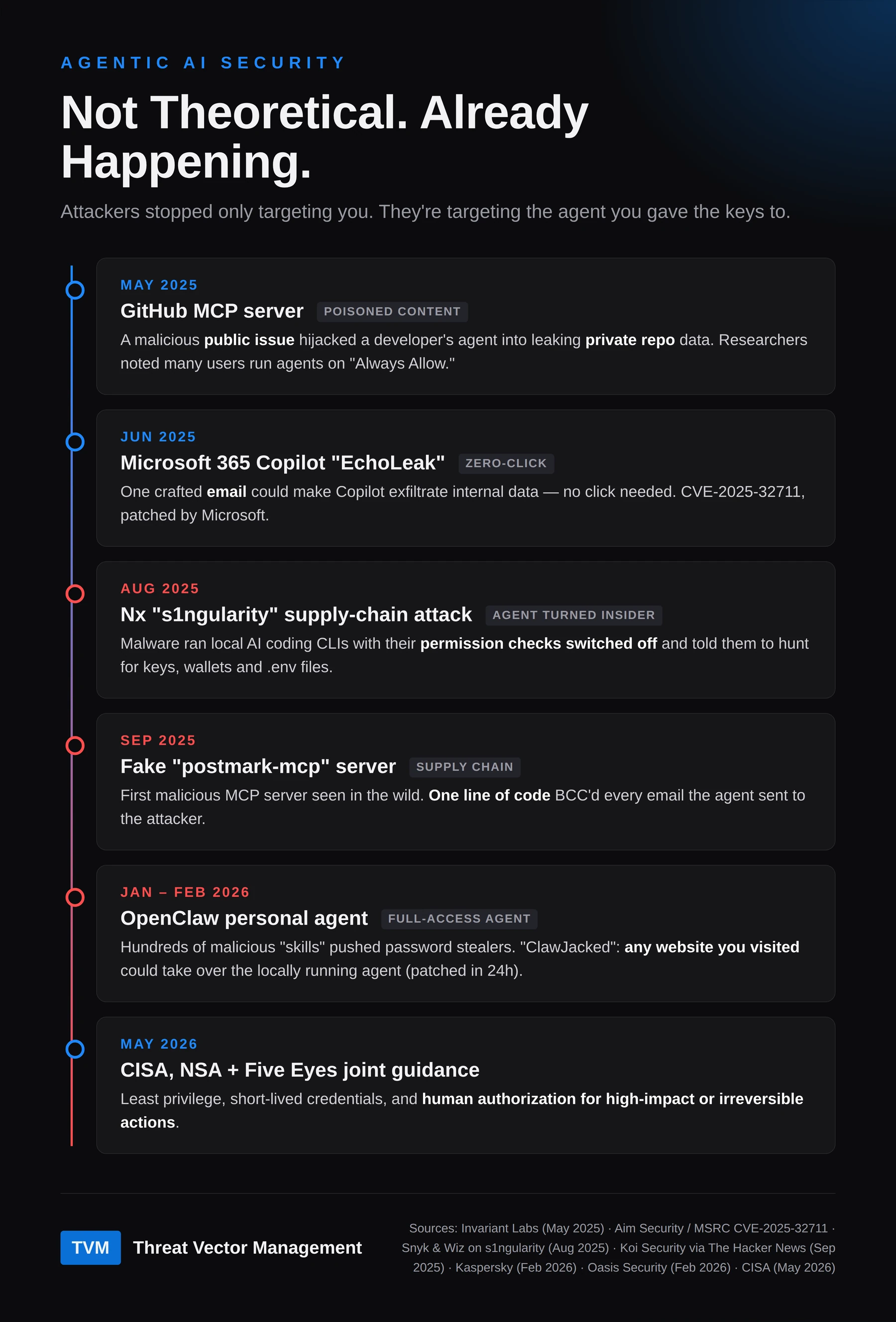
Nobody broke the AI model in any of these. They poisoned what it read, or what it installed, and let the access the user had already granted do the rest.
Framework mapping: OWASP ASI04 Agentic Supply Chain Vulnerabilities, ASI03 Identity & Privilege Abuse; NIST SP 800-53 SI-7 (software integrity) and SR-3 (supply chain controls).
Two cases from this essay: the Nx s1ngularity packages of 26 August 2025 (Wiz, Snyk) and the fake postmark-mcp server (Koi Security, now part of Palo Alto Networks; reported by The Hacker News and Snyk). Every indicator is the researchers' own.
- Not evidence of harm
- Attacker code ran, or attacker activity
- Data stolen or device targeted
- Stage 0A bad version is published
Malicious versions of the Nx build package and several of its plugins were published to npm on 26 August 2025. The fake postmark-mcp package built trust over 15 versions before version 1.0.16 added a backdoor.
Exposure, not harmnx 20.9.0, 20.10.0, 20.11.0, 20.12.0, 21.5.0, 21.6.0, 21.7.0, 21.8.0Wiz and Snyk; Wiz also lists @nx/devkit, @nx/js, @nx/node, @nx/workspace and otherspostmark-mcp 1.0.16 and laterSnyk's malicious package record; Postmark says it never published this package
A bad version in a lockfile is exposure; it proves harm only once it was installed and ran.
- Stage 1The install script ran
Installing a bad Nx version ran a post-install script on Linux and macOS. It searched for wallets, keystores, .env files and SSH keys, and asked any installed AI command-line tool to help with its permission checks turned off.
Attacker code ran on that computertelemetry.jsthe post-install script/tmp/inventory.txtlist of sensitive file paths; also /tmp/inventory.txt.bak--dangerously-skip-permissions, --yolo, --trust-all-toolsflags passed to Claude Code, Gemini CLI and Amazon Qsudo shutdown -h 0appended to ~/.bashrc and ~/.zshrcSHA-1 telemetry.js 2379ac0e03b1a67c4ca5693136eff4945e644a91one variantSHA-1 telemetry.js e5d1f3c45ee7cca6ae59cf64e0573050bbe136econe variantSHA-1 telemetry.js b4f20b39aa6df1002872f07973024d85aa49abafone variantSHA-1 telemetry.js d2438106211ebd12c4f0a248848bc9864c97a3c0one variant
Wiz lists the file artifacts as not unique to this attack, so one alone is a lead, not proof.
- Stage 2Secrets and mail left the computer
The Nx script encoded what it found in base64 two or three times and uploaded it to new public repositories on the victim's own GitHub account. The postmark-mcp backdoor copied every email sent through it to the attacker by blind copy (BCC).
Data left the devices1ngularity-repository, s1ngularity-repository-0, s1ngularity-repository-1public repositories on the victim's accountresults.b64the uploaded fileapi.github[.]com /user/repos, /repos/*/contents/results.b64outbound API callsphan@giftshop[.]clubthe BCC address
GitHub disabled the attacker-created repositories on 27 August 2025, so they no longer show up in search; check audit logs instead.
- Stage 3Stolen keys were used
Between about 28 and 29 August 2025, an attacker used leaked GitHub tokens to make victims' private repositories public. Wiz counted more than 400 users and organizations and more than 5,500 repositories.
Accounts were taken overs1ngularity-repository-#5letters#Wiz's pattern for private repositories made public and renamed
- Stage 1
If you see: one of those versions in a lockfile or installed package folder.
Where: package-lock.json, yarn.lock or pnpm-lock.yaml, and the node_modules folder.
It means: the bad code reached that computer; Wiz says the Nx payload ran only on Linux and macOS.
Then do: remove it, clear the npm cache, upgrade to a current version, and look for the next stage.
- Stage 2
If you see: /tmp/inventory.txt or /tmp/inventory.txt.bak, a sudo shutdown -h 0 line at the end of ~/.bashrc or ~/.zshrc, or new terminal windows shutting the computer down.
Where: that computer's files.
It means: the script ran and listed the secrets on that computer.
Then do: delete those files and lines, and treat every key, token and wallet on that computer as stolen.
- Stage 3
If you see: a repository named s1ngularity-repository (or with -0 or -1) on the account, a file named results.b64, or blind copies of sent mail going to giftshop[.]club.
Where: the GitHub account and organization audit log, and the mail service's sending logs.
It means: the secrets or the mail have left; Wiz warns that base64 is trivially decoded, so treat the data as public.
Then do: revoke and reissue GitHub and npm tokens, SSH keys, API keys and environment secrets, move crypto funds to new wallets, remove postmark-mcp, and change any password that was sent by email.
What security tools already have for this
A package firewall is the only control here that acts before the install; endpoint tools mostly see the damage after the script runs.
Package firewall
Can help: A package firewall can stop a known malicious package or add-on before it is installed, which is the only point in these attacks where a control acts before the code runs.
| Vendor | What they have published | Status |
|---|---|---|
| Socket | On 27 August 2025 Socket said its AI scanner flagged the malicious Nx releases. Socket Firewall blocks confirmed malicious packages when installs are run through it (for example sfw npm install) and only warns on threats its AI detects. Socket's MCP security guide describes the postmark-mcp backdoor, but we found no dated Socket alert for that package. | Published: run installs through Socket Firewall |
| Sonatype | Sonatype logged the Nx attack as malicious package record sonatype-2025-003584 on 28 August 2025. To block such packages, it tells Repository Firewall customers to enable quarantine for each proxy repository. We found nothing from Sonatype on postmark-mcp. | Published: for Nx, with quarantine turned on; nothing published found for postmark-mcp (checked 18 Nov) |
| JFrog | On 28 August 2025 JFrog said it had added the malicious Nx packages to its Xray database and the JFrog Catalog. To block them before download, enable JFrog Curation for the repository with a Malicious Package condition and the Block action. JFrog has written about postmark-mcp but we found no record for it in Xray. | Published: for Nx, turn on Curation with a Malicious Package block |
| Snyk | Snyk listed the bad Nx versions (SNYK-JS-NX-12205542, 27 August 2025) and postmark-mcp versions 1.0.16 and later (SNYK-JS-POSTMARKMCP-13052679, 26 September 2025), and advises blocking giftshop[.]club. Its install blocker, Malicious Code Defense, was in private preview as of 4 August 2026. | Published: advisories; install blocking is in private preview |
Endpoint detection and response (EDR)
Only after a break-in: Endpoint detection can spot AI coding tools started with their permission checks turned off or scanning for keys and wallets, but only once the malicious script is already running on the developer's computer.
| Vendor | What they have published | Status |
|---|---|---|
| Microsoft Defender | Microsoft's Digital Defense Report 2026 describes s1ngularity and tells defenders to watch for AI command-line tools run with permissive flags and assistant-driven file scans. It names no detection or hunting query for this attack, and Microsoft has nothing on postmark-mcp. | Analysis only |
| CrowdStrike | No CrowdStrike page names s1ngularity, Nx or postmark-mcp. Its closest post, on 21 July 2026, covers a different npm worm that abused AI coding assistants. | Nothing published found (checked 18 Nov) |
| SentinelOne | SentinelOne's vulnerability database entry for the Nx compromise, which says it was written with AI, lists signs to hunt for, such as unexpected GitHub repository creation from developer computers. It names no SentinelOne detection. | Analysis only |
| Sophos | A Sophos essay of 10 November 2026 uses s1ngularity as its example of AI coding tools run with permission checks off, and suggests decoy keys to reveal secret hunting. It names no detection for this attack. | Analysis only |
| Trend Micro | Trend Micro, whose research pages now open on its TrendAI site, described on 9 October 2025 how this malware hijacked locally installed AI command-line tools. It gives no detection or hunting query for it. | Analysis only |
| Elastic | Elastic's public detection rules include GenAI CLI Started with Unsafe Permission Bypass (added 24 June 2026) and GenAI Process Accessing Sensitive Files (added 4 December 2025), which match what this script did. Neither names s1ngularity, and we found no rule for Amazon Q's flag. | Published: general rules that fit this attack |
| Palo Alto Cortex XDR | Unit 42 mentions s1ngularity only as background in its later npm write-up, and we found no Cortex XDR detection that names it. Palo Alto Networks completed its purchase of Koi, the firm that found postmark-mcp, on 14 April 2026. | Analysis only |
| Huntress | Huntress has not written about the Nx or postmark-mcp packages. It covered the Shai-Hulud worm, which stole developers' GitHub and npm keys from inside poisoned npm packages, and advised auditing dependencies and replacing exposed keys (30 November 2025). In the later poisoning of the axios package, Huntress saw at least 135 of its customers' computers contact the attacker's server and said any computer that ran the bad code should be treated as fully taken over (31 March 2026). | Only after a break-in: it sees the bad code once a poisoned package has run; nothing on Nx or postmark-mcp |
Web application firewalls, intrusion prevention, DNS filtering and cloud app brokers are left out because the bad code arrived through the normal package registry and sent its data to GitHub and by email, which those tools treat as ordinary traffic, and vulnerability scanners are left out because they only list a bad version after it is installed.
Vendors that blocked our reader for this post: none recorded. We began recording this on 19 November 2026, after this post was researched.
Standing access is the real risk
A person with admin rights goes home at night. An agent with standing access to your drive, your email and your browser profile is always on, and always reachable by whatever content it touches next.
In May 2026, CISA, the NSA and their Five Eyes partners published joint guidance, Careful Adoption of Agentic AI Services. The core recommendations will look familiar to anyone who has run an identity program: least-privilege access so agents have only the permissions their task needs, short-lived credentials, and human authorization — not the agent's own judgment — for high-impact or irreversible actions.
IBM's 2026 Cost of a Data Breach report shows how far behind most organizations are: roughly one in five organizations in IBM's study reported an AI-related breach, and of those, 92% lacked proper AI access controls, such as role-based access and multifactor sign-in.
Now what? Break the trifecta
You don't need every control on the market. You need at least one leg of the triangle cut, and ideally all three narrowed. Here's where the common controls actually sit:
① Sensitive data — shrink what it can reach - Give the agent its own work folder and nothing else. Never your Downloads or Documents folder — that's where bank statements, tax returns and signed contracts land. - Run the agent as your everyday standard user, never as an administrator. - Application control (an allow-list of approved apps) so a hijacked agent can't launch whatever it downloads. - Endpoint protection / EDR to flag credential and cookie theft — the exact behavior in the s1ngularity attack.
② Untrusted content — filter what it reads - DNS filtering to block known-bad domains. - IPS on the way in to stop exploits and malware. - An AI gateway that inspects prompts and tool results on the way in. - Only vetted, version-pinned plugins, skills and MCP servers.
③ External communication — control what leaves - DLP on the way out to catch sensitive data leaving. - An egress allow-list, so the agent can only reach the sites the job needs. - The AI gateway inspecting output as well as input.
In the middle — a human OKs anything that sends, pays or deletes, runs a script, or asks for a new folder or website.
Two of those deserve a closer look, because they're the prompts people approve without thinking:
- "Can I run this script?" If you can't read it yourself, get a second opinion before you say yes. Remove any passwords, keys or internal server names, then paste it into a separate, private AI chat — Duck.ai is one option that doesn't tie chats to an account — and ask, "What does this do? Is anything in it risky?" It's a second opinion, not proof: the same hidden-instruction trick can fool that AI too. If it touches files outside the work folder, downloads something, or sends data anywhere, say no.
- "Can I access this folder?" Make sure it's the AI's own work folder. If it's asking for Downloads, Documents, Desktop or your whole home folder, the answer is no.
Underneath all three — the foundation: - Keep two accounts on every laptop. Your daily account is a standard user. A separate admin account is used only to install software. If you have one login and it's an admin, anything that hijacks you — or your agent — gets the whole machine. - MFA on a separate device (more on this below). - Never "remember this device" on banking, email or anything that matters. - No "Always Allow" and no skip-permission modes on a machine that holds real data.
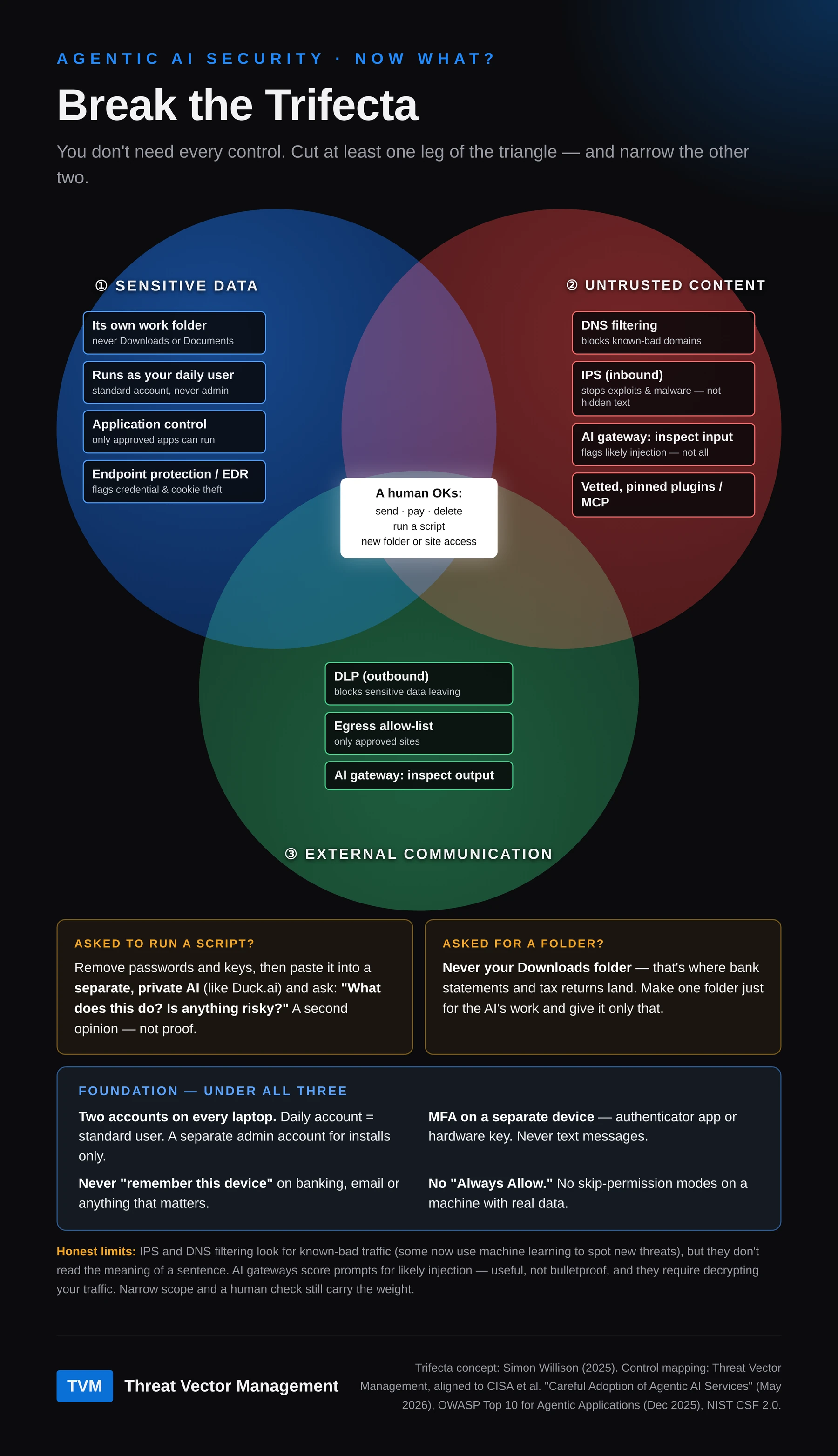
To be straight about the limits: IPS and DNS filtering look for known-bad traffic and domains. Some now use machine learning to spot never-before-seen exploits, but they're still reading network traffic, not the meaning of a sentence — so they won't catch an instruction hidden in a perfectly normal-looking page or email.
Is an AI gateway the better answer? It's the most direct control for this problem, and worth looking into — with eyes open. There are two kinds:
- For the AI your team uses (a secure web gateway or SASE service with AI controls): it can block unapproved AI tools, apply DLP to what people paste into prompts, and log AI use. To see inside that traffic it has to decrypt it, which means installing the gateway's root certificate on every device (trivial with device management) and rotating that certificate on a schedule (which can be automated). Apps that pin their certificates will break unless you exempt them — and exempted traffic isn't inspected.
- For AI apps you build (an API gateway or "firewall for AI" in front of your model): it scores prompts for likely injection and can block or flag them. No certificates on laptops, but it only protects that app.
The trade-offs: detection is probabilistic, so it catches likely injection, not all of it. And a decrypting gateway sees everything that passes through it, so choose the vendor as carefully as you'd choose your email provider, and exclude banking and health traffic from inspection. For a small business already on a SASE platform, turning on its AI controls is a fast win. For a household, it's usually overkill — scope, separate accounts and the human check come first.
Framework mapping: CISA et al., Careful Adoption of Agentic AI Services (May 2026); NIST CSF 2.0 PR.AA-05 (least privilege and separation of duties); NIST SP 800-53 AC-6 (least privilege), AC-6(2) (non-privileged accounts for daily use), CM-7(5) (allow-listing), SC-7 (boundary protection). An agent with standing, broad access falls short of the intent of all of them.
The short version: K.E.Y.S.
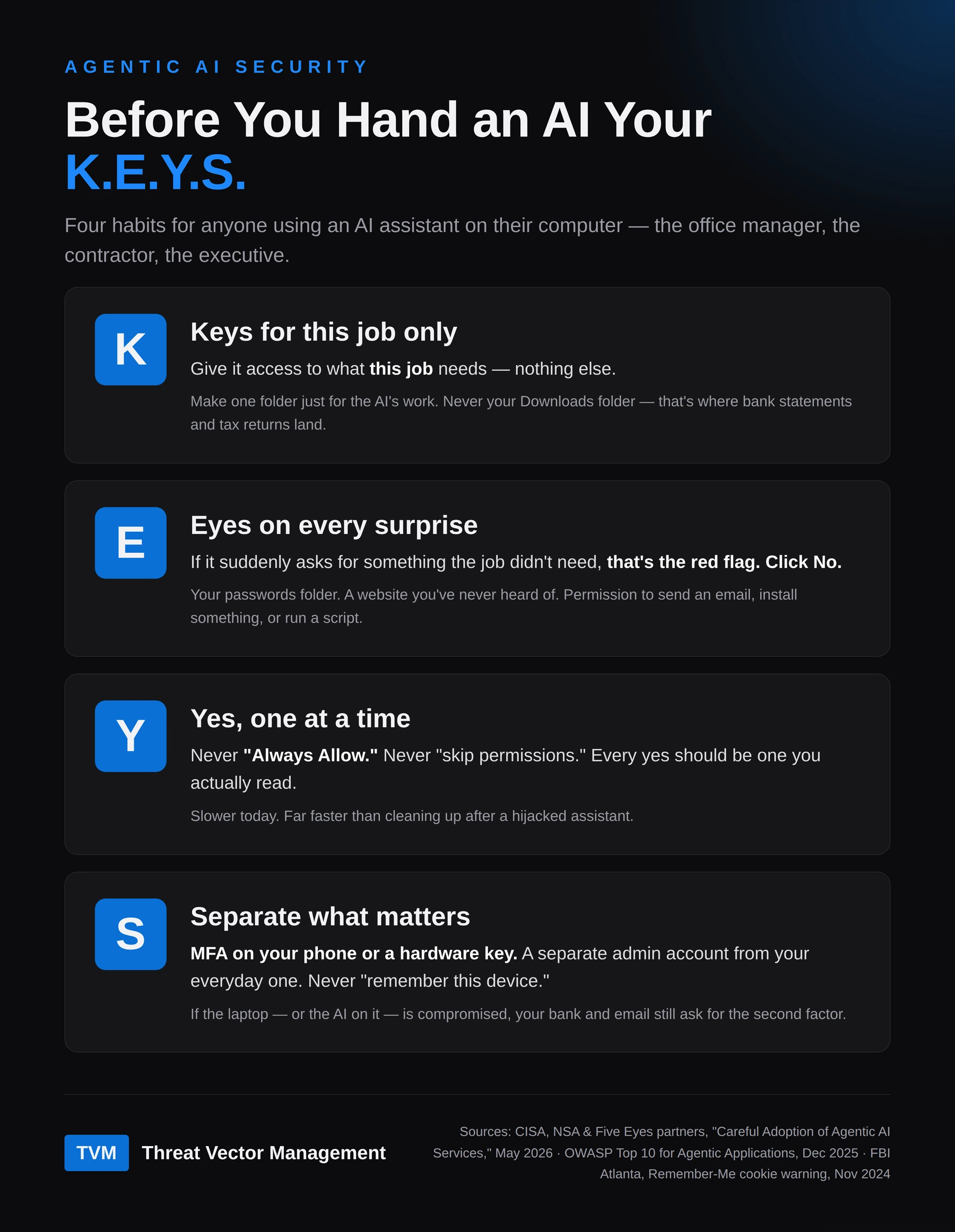
Not everyone reading this runs a security stack. For the office manager, the contractor with one laptop, or the executive who just wants the assistant to handle email, it comes down to four habits before you hand an AI your K.E.Y.S.:
- K — Hand over keys for this job only. Give it access to what this job needs, nothing else. Make one folder just for the AI's work — never your Downloads folder, which is where bank statements and tax returns land. Not your whole computer, your email and your bank.
- E — Keep your eyes on every surprise. You won't always know when a prompt is coming, and that's the point. If it suddenly asks for something the job didn't need — your passwords folder, a website you've never heard of, permission to send an email, install something or run a script — that's the red flag. Click No.
- Y — Say yes one at a time. Never "Always Allow." Never "skip permissions." Every yes should be one you actually read.
- S — Separate what matters. MFA on your phone or a hardware key. A separate admin account from your everyday one. Never "remember this device."
The honest math: prompts aren't free
It would be easy to say "each prompt only takes a few seconds" and stop there. That undersells the cost, so let's add it up.
Assume 10 seconds to read and answer a prompt, and 250 workdays a year. (Both are our estimates; nobody has published a good measurement.)
| How you work | Per year | 3 years | 10 years |
|---|---|---|---|
| Light use · 20 prompts/day | 14 hrs | 42 hrs | 139 hrs |
| Heavy, unscoped · 100 prompts/day | 69 hrs | 208 hrs | 694 hrs |
| Heavy, scoped and sandboxed · −84% | 11 hrs | 33 hrs | 111 hrs |
So how long until something goes wrong? There's no clean actuarial number for AI agents yet, but there are good numbers for businesses in general:
- 29% of businesses with fewer than 250 employees were hit by at least one cyber-attack in the last 12 months (Hiscox Cyber Readiness Report 2026, a survey of 6,800 people responsible for cyber security at those businesses). Most "attacks" aren't breaches, but it shows how often someone is knocking.
- Cyentia Institute's IRIS 2025 puts the yearly chance of a major cyber incident across organizations at 9.3%. That's roughly one every 11 years — or about 62% odds of at least one over 10 years, if the 2024 rate holds.
Now take the worst case for our own argument: 100 prompts a day, every workday, for ten years. That's about 694 hours — roughly $69,000 of your time at $100 an hour. Put that next to one incident: the median ransomware payment alone was $139,875 in Verizon's 2026 DBIR, before downtime, cleanup, fines or lost clients. Hiscox found that 28% of small businesses that had an incident were hit with financial penalties. IBM's average breach took 247 days to identify and contain in its 2026 report.
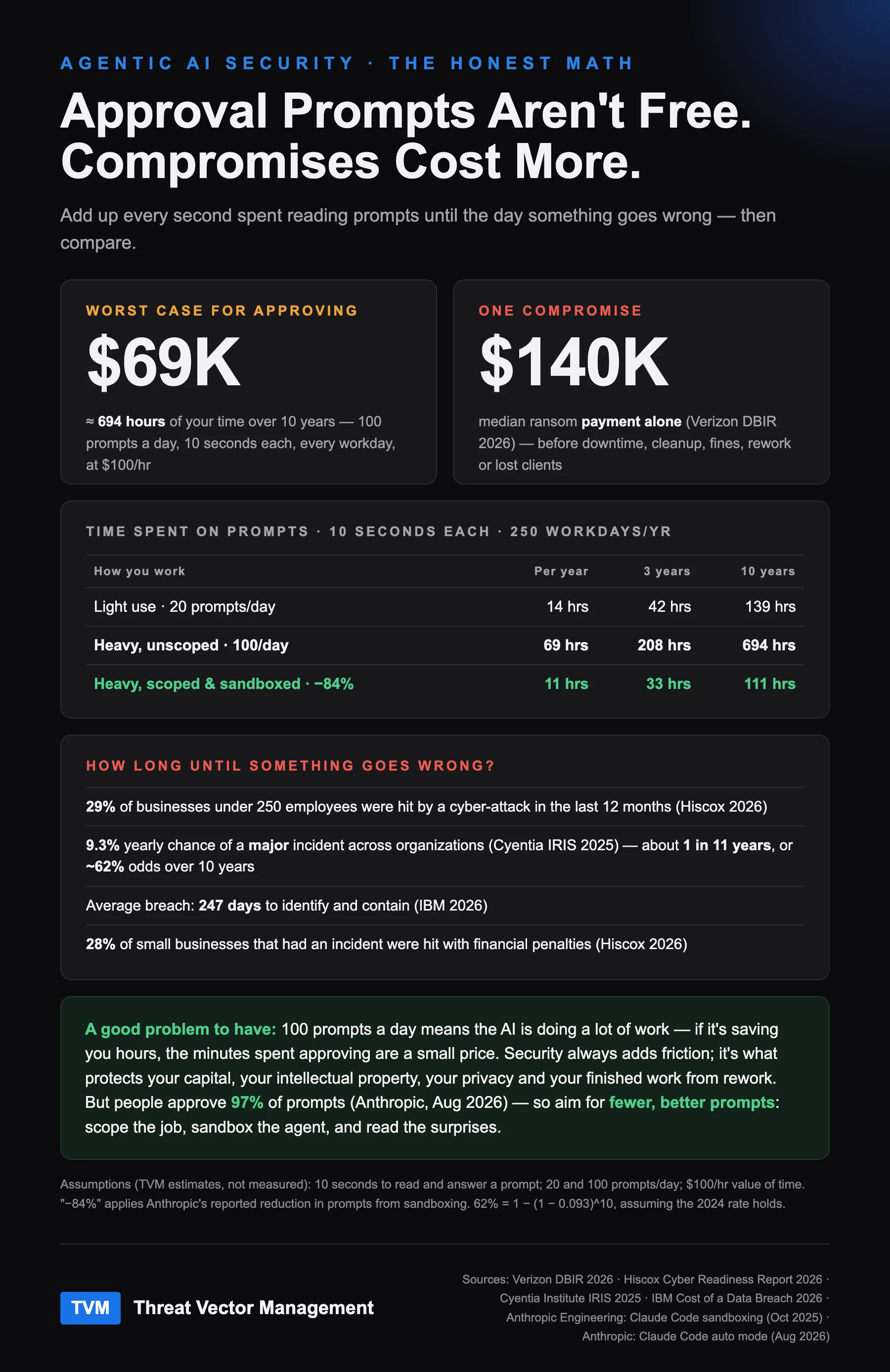
The number that should bother you most isn't either of those. Anthropic reports that people approve 97% of the permission prompts they see in Claude Code (August 2026; its March post put the figure at 93%), and that approval fatigue makes people stop paying attention. In Anthropic's controlled experiment with 1,053 paid professional testers, people caught just 13.6% of dangerous commands (Anthropic's automated reviewer caught 89%). A prompt you don't read costs time and protects nothing.
And 100 prompts a day is a good problem to have. It means the AI is doing a lot of work for you — if it's saving you hours, the minutes spent approving are a small price. Security always adds friction. That friction is what protects your capital, your intellectual property, your privacy, and the work you've already finished from having to be redone.
So the answer isn't "Always Allow." It's fewer, better prompts. Anthropic found sandboxing cut permission prompts by 84% in its own internal use. Scope the job tightly, sandbox the agent, and the prompts that are left are the surprises worth reading — which is what the E in K.E.Y.S. is for.
Measure it: eight KRIs to start tracking
You can't manage approval fatigue by feel. Key risk indicators (KRIs) tell you whether your agents are under control or just busy. The first three come from our talk at the Polk County Security Summit. The other five turn the trifecta and the MFA advice in this post into numbers you can count.
| KRI | What to count | Target (ours) | Why it matters |
|---|---|---|---|
| 1. AI approval rate | Prompts approved ÷ prompts shown, per person and per agent | Trending down, with every denial logged | Claude Code users approve 97% of prompts (Anthropic, Aug 2026). Near 100%, a prompt is a habit, not a control. |
| 2. Time to approve | Seconds from prompt shown to answer | No faster than a read: about 6 seconds for a 25-word prompt | By the 20th time people saw the same standard warning, the median time to dismiss it was 1.2 seconds (Bravo-Lillo et al., 2014). Adults read non-fiction at about 238 words a minute (Brysbaert, 2019). |
| 3. Actions under a human's identity | Agent actions logged under a person's account or session instead of the agent's own | Zero | The borrowed-badge problem: when the agent wears your badge, the logs can't tell you apart. CISA's guidance gives each agent its own identity. |
| 4. Agents with all three trifecta legs | Agents that can reach sensitive data, read untrusted content and send data out | Zero | That combination is the exfiltration path (Willison, 2025). |
| 5. Standing or shared agent credentials | Agent logins that are long-lived API keys or shared service accounts | Zero; short-lived credentials only | CISA and its Five Eyes partners prefer short-lived credentials over persistent secrets (May 2026). |
| 6. Unvetted or unpinned plugins | MCP servers, skills and plugins not from the real publisher, or not pinned to a version | Zero | The fake postmark-mcp server and the malicious OpenClaw skills were both unvetted third-party add-ons that looked legitimate. |
| 7. Remembered devices on high-value accounts | Banking, primary email and password-manager sessions marked “trusted” | Zero | A stolen Remember-Me cookie signs in without a password or MFA (FBI, 2024). |
| 8. Text-message MFA on high-value accounts | Accounts that still accept SMS or voice-call codes | Zero | CISA: “Do not use SMS as a second factor for authentication.” |
How to read them together. A high approval rate plus approvals faster than a read means people are rubber-stamping. The fix is not more prompts. Scope the agent (the K in K.E.Y.S.) so the prompts that remain are rare enough to read.
Where to start. KRIs 7 and 8 are a few settings per account, so do them first. KRIs 3 to 6 need an inventory of your agents and what they connect to; that can follow within the quarter. KRIs 1 and 2 need logs from your agent tools, so add them as those tools allow.
The targets are our recommendations, not an industry standard. The sources behind each row are listed below.
Your last line of defense: MFA that lives somewhere else
Where it hits: The flaw is a remembered sign-in cookie kept in the browser on a staff computer, and the harm lands in the email, cloud and business accounts that the cookie opens without a password or MFA.
Can be addressed by:
- Only after a break-in: Endpoint detection can catch malware stealing browser cookies on the computer, and sign-in alerts can catch a stolen cookie being replayed, but both act once the theft is under way; leaving Remember this device unticked on the accounts that matter is what prevents it.
Each vendor, kind by kind, is under What security tools already have for this.
Assume, for a moment, the agent is compromised. What stops the attacker from walking into your bank, your email or your social accounts?
Mostly this: MFA on a separate device, and a computer your accounts don't trust by default.
When you tick "Remember this device" or "Trust this browser," the site stores a long-lived cookie that says, in effect, this person already passed MFA. In late 2024 the FBI's Atlanta field office warned that criminals are increasingly stealing these Remember-Me cookies: "If a cybercriminal obtains the Remember-Me cookie from a user's recent login to their web email, they can use that cookie to sign-in as the user without needing their username, password, or multifactor authentication (MFA)."
Those cookies live in your browser profile on disk — exactly where infostealer malware looks, and within reach of any agent you've given broad file or command-line access to. The s1ngularity attack above was a file hunt run through the victim's own AI tools. Browser session data is an obvious next stop.
To be precise about the trade-off: skipping "remember this device" doesn't make you immune to session theft. Any logged-in session has a cookie. What it does is shrink the window from weeks to hours and force a fresh MFA check on the accounts that matter.
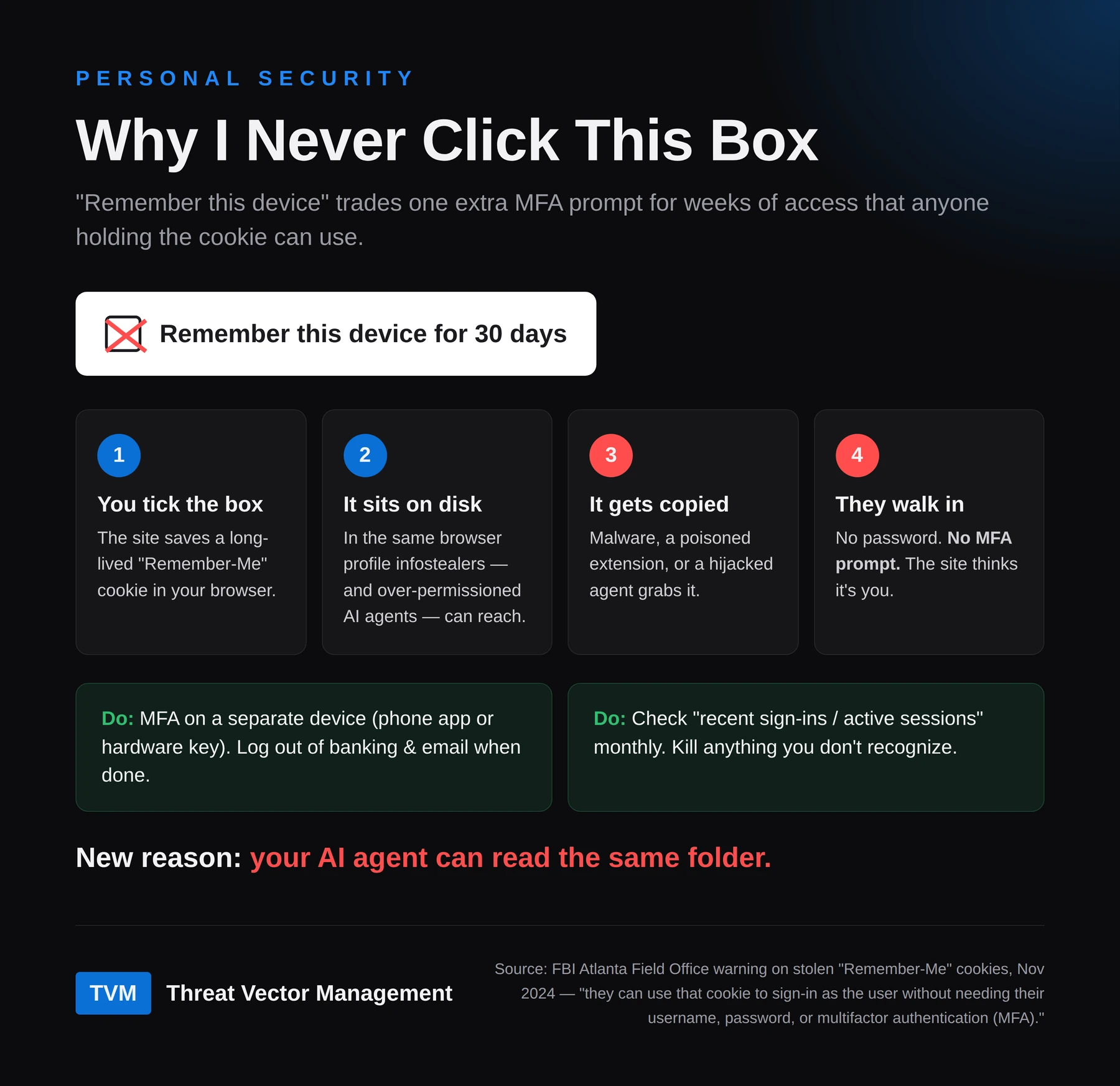
What to do: - Never mark your computer or browser as trusted for banking, primary email, password manager, cloud storage or social media. - Keep MFA on a separate device — an authenticator app on your phone or a hardware key — not on the same machine the agent runs on. - Log out of high-value accounts when you're done. It's the cheapest control on this list. - Once a month, check each important account's "recent sign-ins" or "active sessions" page and end anything you don't recognize.
Where your MFA should live
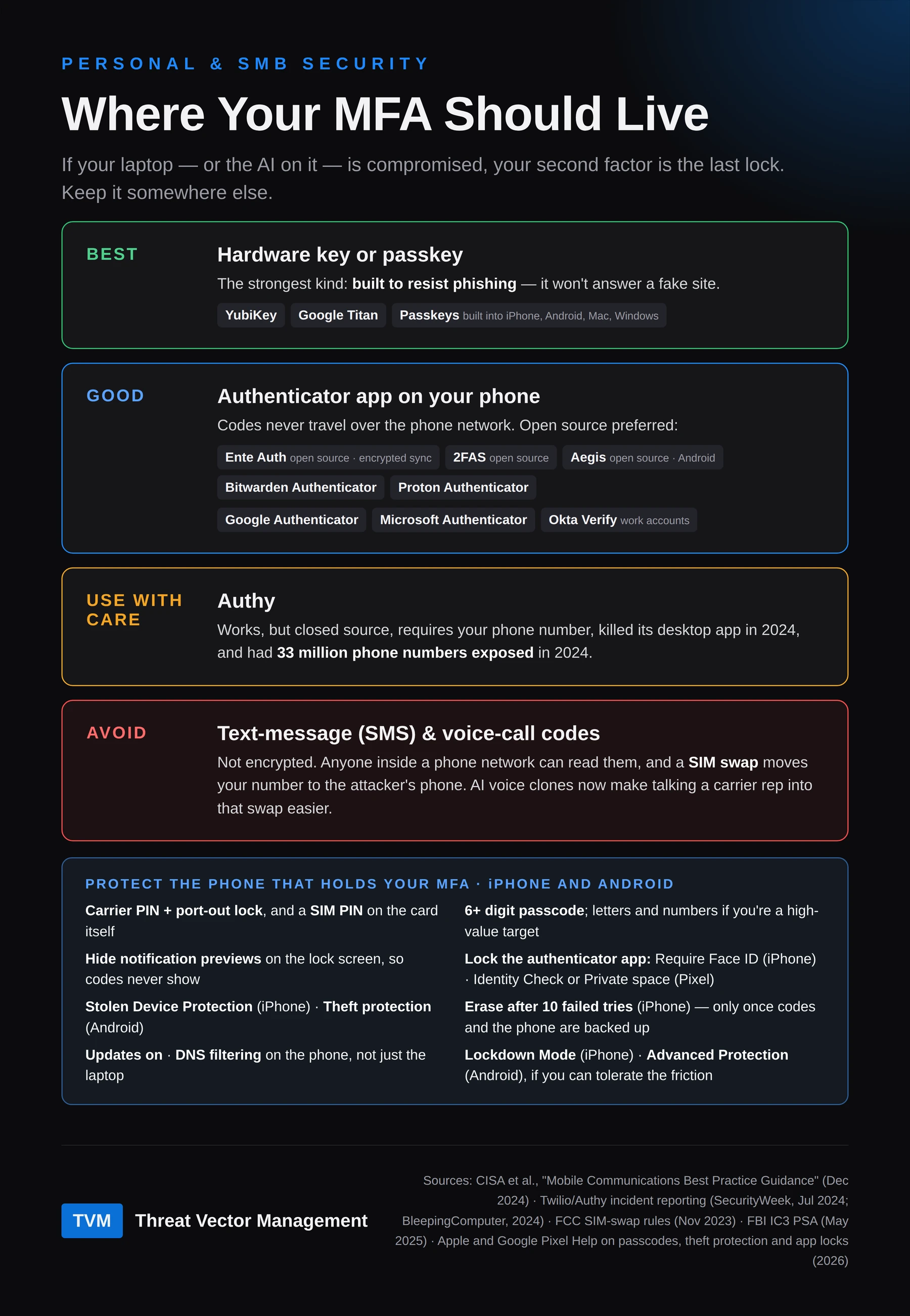
Not all second factors are equal. In order of strength:
- The best choice is a hardware key or passkey. YubiKey, Google Titan, or the passkeys built into your phone and computer. These are built to resist phishing: they won't answer a fake site. CISA calls hardware FIDO keys "the most effective."
- A good choice is an authenticator app on your phone. The codes never travel over the phone network. We prefer open source:
- Ente Auth — open source, end-to-end encrypted sync, works on phone and desktop
- 2FAS — open source, iPhone and Android
- Aegis — open source, Android only
- Bitwarden Authenticator and Proton Authenticator — open-source apps
- Mainstream options that are fine: Google Authenticator, Microsoft Authenticator, and Okta Verify for work accounts.
- Use with care — Authy. It works, but it's closed source, requires your phone number, shut down its desktop app in 2024, and had 33 million users' phone numbers exposed in 2024.
- Avoid — text-message (SMS) and voice-call codes. CISA's guidance is blunt: "Do not use SMS as a second factor for authentication. SMS messages are not encrypted." Anyone with access inside a phone carrier's network can read them, and phone networks have been breached. A SIM swap — talking a carrier into moving your number to the attacker's phone — hands over every code. The FCC tightened carrier rules against this in 2023, but it still happens, and AI voice cloning makes impersonating you to a carrier rep easier. The FBI has already warned about AI-cloned voices impersonating senior officials.
To be precise: MFA can have technical flaws. Oasis Security's "AuthQuake" research showed Microsoft's MFA could be brute-forced before Microsoft fixed it in October 2024. But that's rare. Nearly every "MFA bypass" goes around the second factor, not through it — which is why where it lives matters so much.
Protect the phone that holds your MFA. Keep it as hardened as you can tolerate. Updates stay on, filtering DNS goes on the phone as well as the laptop, and apps come only from the official store. Then:
| Setting | iPhone | Android (Pixel and stock Android) |
|---|---|---|
| Carrier PIN + port-out lock | In your carrier’s app or account | Same |
| SIM PIN, so a thief can’t move your SIM to another phone | Settings > Cellular > SIM PIN. Get the default PIN from your carrier first; a wrong guess can lock the SIM for good | Search Settings for “SIM lock”. Same warning about the default PIN |
| 6+ digit passcode; letters and numbers if you’re a high-value target | Settings > Face ID & Passcode > Change Passcode > Passcode Options | Settings > Security & privacy > Device unlock > Screen lock: PIN or password |
| Hide notification previews on the lock screen, so codes and reset links never show | Settings > Notifications > Show Previews > When Unlocked | Search Settings for “notifications on lock screen” and hide sensitive content |
| Lock the authenticator app itself | Long-press the app > Require Face ID (iOS 18 and later) | Turn on Identity Check (below), or put the app in Private space with its own lock: Settings > Security & privacy > Privacy > Private space |
| Theft protection | Settings > Face ID & Passcode > Stolen Device Protection | Settings > Google > All services > Theft protection: Theft Detection Lock, Offline Device Lock, Failed Authentication Lock, Identity Check |
| Erase after failed tries — only once your codes and phone are backed up | Settings > Face ID & Passcode > Erase Data (after 10 failed attempts) | Pixels don’t wipe themselves; Google’s settings lock the phone instead. Samsung phones on One UI 9 lock for good after 13 failed tries, and only a factory reset reopens them. |
| If you can live with the friction | Lockdown Mode | Advanced Protection (Android 16) |
Before you turn on Erase Data, make sure you can survive it. A wipe also erases your authenticator unless its codes are synced or exported, so set that up first. Keep your accounts’ recovery codes on paper, and keep a current phone backup. Otherwise a curious child or a prankster can lock you out of your own accounts.
App locks fall back to the phone passcode. They stop someone who picks up your unlocked phone, not someone who watched you type the passcode. That second case is what Stolen Device Protection and Identity Check are for: they demand Face ID or a fingerprint for sensitive changes away from home. Some menu names vary by phone maker and version; search Settings if a path doesn’t match.
Framework mapping: OWASP ASI09 Human-Agent Trust Exploitation; NIST CSF 2.0 PR.AA-03 (users, services and hardware are authenticated); NIST SP 800-63B (restrictions on SMS/phone-network authenticators).
Built from the FBI Atlanta warning of 30 October 2024 and the detections security vendors have published for each step. Where the cookie is stolen depends on the malware, so the middle stage shows detections rather than one file name.
- Not evidence of harm
- Attacker code ran, or attacker activity
- Data stolen or device targeted
- Stage 0Remember this device is ticked
The site stores a Remember-Me cookie that the FBI says often lasts 30 days and lets the browser sign in without the password or MFA.
Exposure, not harm"Remember this device" checkbox ticked at sign-inFBI Atlanta
- Stage 1Malware takes the cookie from the browser
The FBI says victims hand over their cookies without knowing it when they visit suspicious websites or click phishing links that download malicious software. An agent given broad file access can reach the same browser profile.
Attacker code ran on that computerUnusual process accessed web browser cookiesCortex XDR alert nameCookies access by an unusual processElastic Security Labs hunting queryPotential Cookies Theft via Browser DebuggingElastic detection rule
- Stage 2The cookie is used from somewhere else
The attacker loads the cookie into their own browser and is signed in as you, with no username, password or MFA prompt.
Someone else is signed in as youunrecognized login in the account's recent device login historyFBI Atlanta: check it periodicallySkipped MFA on remembered device from uncommon ISP sign-inMicrosoft Defender alertanomalousTokenMicrosoft Entra ID Protection risk detection: a token played from an unfamiliar location
Microsoft says its anomalous token detection still flags some false positives at low and medium risk levels.
- Stage 1
If you see: an alert that an unusual program read the browser's cookie store, or that a browser was started in debugging mode by something other than you.
Where: the endpoint protection's alerts.
It means: malware may have copied the signed-in sessions; the password and MFA were not needed.
Then do: take the computer offline, remove the malware or rebuild the computer, then sign out of every important account from another, clean device.
- Stage 2
If you see: a login you do not recognize in an account's recent device login history, or a work-account alert that MFA was skipped on a remembered device from an unusual provider.
Where: the account's security or recent activity page, and, for work accounts, Microsoft Defender and Entra ID Protection.
It means: someone may be using the session from elsewhere.
Then do: end all sessions from the account's security page, change the password, check mail forwarding and recovery details, and report the account takeover to the FBI's Internet Crime Complaint Center (IC3).
What security tools already have for this
Two of these vendors catch the theft on the computer; Microsoft's alerts catch the replay at sign-in. Neither replaces leaving Remember this device unticked on the accounts that matter.
Endpoint detection and response (EDR)
Only after a break-in: Endpoint detection can catch malware stealing browser cookies on the computer, and sign-in alerts can catch a stolen cookie being replayed, but both act once the theft is under way; leaving Remember this device unticked on the accounts that matter is what prevents it.
| Vendor | What they have published | Status |
|---|---|---|
| Microsoft Defender | Microsoft Defender raises named alerts when a stolen cookie is replayed, including Skipped MFA on remembered device from uncommon ISP sign-in and Stolen session cookie replay detected. These come from its identity protection and Microsoft Entra sign-ins, not from the endpoint sensor seeing the theft; we found no endpoint alert for a program reading the browser's cookie file. | Published: alerts at sign-in, after the cookie is stolen |
| CrowdStrike | CrowdStrike says Falcon Seraphic Enterprise Browser, added to the Falcon platform on 4 November 2026, helps stop session token theft inside active browser sessions. On 20 August 2025 it said the Falcon sensor detects and prevents the SHAMOS macOS stealer, which takes browser data, with Suspicious process prevention turned on. | Published: turn on Suspicious process prevention |
| SentinelOne | SentinelOne's guide to information-stealing malware (updated 7 May 2026) advises alerting when a browser starts with --remote-debugging-port or --headless from an unusual parent program, and on sign-ins from new places or devices that suggest stolen session tokens are being replayed. It names no detection for a stolen remember-me cookie. |
Analysis only: advice to watch for these signs; no named detection |
| Sophos | Sophos X-Ops said on 18 August 2022 that Sophos uses behavioral rules to stop scripts and untrusted programs from abusing cookies, and detects information-stealing malware in memory and by behavior. It gives those rules no feature name. | Published: built into its behavior protection |
| Trend Micro | Trend Micro's research of 21 April 2026 explains that infostealers now go after session tokens and login cookies. We found no named Trend Micro detection for browser cookie theft. | Analysis only |
| Elastic | Elastic's public rules include Potential Cookies Theft via Browser Debugging and, on macOS, Suspicious Web Browser Sensitive File Access. On 28 October 2024 Elastic Security Labs showed how infostealers get around Chrome's newer cookie protection and listed hunting queries such as Cookies access by an unusual process. | Published: turn on these rules |
| Palo Alto Cortex XDR | Cortex XDR has an analytics alert, Unusual process accessed web browser cookies, which needs the XDR agent with eXtended Threat Hunting. | Published: needs eXtended Threat Hunting |
| Huntress | Huntress says its identity monitoring service, Managed ITDR, looks for a stolen sign-in cookie being replayed, and that it flags unusual sessions, suspicious inbox rules and unusual sign-ins in Microsoft 365 (18 March 2026). On a Mac, Huntress's endpoint tool caught the MacSync stealer gathering Chrome cookies and saved passwords, its analysts confirmed it, and the computer was cut off from the network before the data was sent (18 March 2026). | Published: the endpoint tool catches the theft on the computer; replay detection needs the separate Managed ITDR service |
Web application firewalls, intrusion prevention, DNS filtering and cloud app brokers are left out because a replayed cookie looks like a normal sign-in to a real site, so the useful signals are on the computer where it was stolen and in the account's sign-in records, and vulnerability scanners do not apply because no software flaw is involved.
Vendors that blocked our reader for this post: none recorded. We began recording this on 19 November 2026, after this post was researched.
The bottom line
The approval prompts are annoying on purpose. They cost real time, so make each one count: give agents the access a job needs, for as long as the job takes, and keep a human on anything that can't be undone. Then keep your MFA somewhere the agent can't reach.
Threat Vector Management advises small businesses and high-value individuals adopting AI — including what agents should and shouldn't be able to touch before you connect them. Start a conversation →
Threat Vector Management is not affiliated with any company operating under the name "ThreatVector."
Sources
- Simon Willison — The lethal trifecta for AI agents, Jun 16, 2025. The trifecta concept is his; the business and household adaptation is ours.
- CISA, NSA, ASD's ACSC, Canadian Centre for Cyber Security, NCSC-NZ, NCSC-UK — Careful Adoption of Agentic AI Services, May 1, 2026. Summaries: Crowell & Moring, Cloud Security Alliance
- OWASP GenAI Security Project — Top 10 for Agentic Applications, Dec 9, 2025
- Invariant Labs — GitHub MCP Exploited: Accessing private repositories via MCP, May 26, 2025
- EchoLeak, CVE-2025-32711 — Hack The Box technical analysis; arXiv paper
- Snyk — Weaponizing AI coding agents for malware in the Nx malicious package, Aug 2025; Wiz analysis
- The Hacker News — First malicious MCP server found stealing emails (postmark-mcp), Sep 2025; Postmark statement
- Kaspersky — New OpenClaw AI agent found unsafe for use, Feb 10, 2026
- Oasis Security — ClawJacked: OpenClaw vulnerability enables full agent takeover, Feb 26, 2026
- IBM — Cost of a Data Breach Report 2026 and IBM's summary of its findings, Jul 29, 2026 (92% lacked AI access controls; 247 days to identify and contain)
- Verizon — 2026 Data Breach Investigations Report (median ransom paid $139,875; Verizon revised its earlier-year medians after adding new data contributors)
- Hiscox — Cyber Readiness Report 2026; press release, Sep 15, 2026
- Cyentia Institute — Information Risk Insights Study (IRIS) 2025 (Figure 6: 9.3% likelihood of at least one incident)
- Anthropic Engineering — Claude Code sandboxing (Oct 2025, 84% fewer prompts) and Claude Code auto mode (Mar 2026, 93% of prompts approved)
- CISA et al. — Mobile Communications Best Practice Guidance, Dec 2024
- Oasis Security's AuthQuake research — The Hacker News, Dec 2024
- Authy incidents — SecurityWeek: 33M phone numbers; BleepingComputer: desktop app retired
- FCC — Protecting Consumers from SIM-Swap and Port-Out Fraud, 2023
- FBI IC3 — Senior US Officials Impersonated in Malicious Messaging Campaign, May 2025
- Cloudflare — TLS decryption requirements and prompt injection detection (example vendor documentation, not an endorsement)
- App comparison (vendor-authored, read with that in mind) — Ente: Ente Auth vs others
- FBI Atlanta — Cybercriminals Are Stealing Cookies to Bypass Multifactor Authentication, Oct 30, 2024
- Anthropic — Auto mode is now the default in Claude Code, Aug 7, 2026 (97% of prompts approved; 1,053 testers caught 13.6% of dangerous commands, auto mode 89%)
- Bravo-Lillo, Cranor et al. — Harder to Ignore? Revisiting Pop-Up Fatigue and Approaches to Prevent It, SOUPS 2014 (Table 1: median 1.2 s to dismiss the standard dialog at the 20th exposure)
- Brysbaert — How many words do we read per minute? A review and meta-analysis of reading rate, Journal of Memory and Language, 2019 (238 wpm, non-fiction)
- Apple — Use a passcode with your iPhone (six-digit default, custom alphanumeric, Erase Data after 10 failed attempts); iOS 18 per-app Face ID lock as described by iDrop News
- Apple — Use a SIM PIN for your iPhone or iPad; Samsung — Lock screen security changes in One UI 9
- Google — Pixel: Protect your personal data against theft; Hide sensitive apps with private space; Android theft protection feature updates, Jan 27, 2026
- Aim Labs: Breaking down 'EchoLeak', the First Zero-Click AI Vulnerability Enabling Data Exfiltration from Microsoft 365 Copilot (Internet Archive copy), 11 June 2025
- Snyk: SNYK-JS-NX-12205542, 27 August 2025
- Snyk: SNYK-JS-POSTMARKMCP-13052679, 26 September 2025
- Snyk: Malicious MCP server on npm postmark-mcp harvests emails, 25 September 2025
- Snyk: Malicious Code Defense, 4 August 2026
- Microsoft Learn: Microsoft Entra ID Protection risk detections, read 18 November 2026
- Akamai: Protect your AI apps, read 18 November 2026
- Palo Alto Networks: Detect MCP threats, updated 24 August 2026
- Palo Alto Networks: Prompt injection multi-category configurability, 16 November 2026
- Palo Alto Networks: Create and configure an API security profile, 16 November 2026
- Microsoft Learn: Prompt Shields, 14 October 2026
- Microsoft Security Response Center: How Microsoft defends against indirect prompt injection attacks, 29 July 2025
- Check Point (Lakera): Prompt Defense, read 18 November 2026
- Check Point (Lakera): Data leakage prevention, read 18 November 2026
- Check Point: Check Point acquires Lakera, 16 September 2025
- F5: Securing agentic AI: how F5 maps to the OWASP Agentic Top 10, 30 December 2025
- F5: Govern your AI present and anticipate your AI future, 18 December 2025
- Netskope: AI security, read 18 November 2026
- Netskope: AI Guardrails profile, read 18 November 2026
- Netskope: Real-time protection policies for MCP security, read 18 November 2026
- Zscaler: Make generative AI tools like ChatGPT safe and secure, 17 May 2023
- Zscaler: Accelerating AI initiatives with zero trust, 2026
- Zscaler: AI Guard for Apps, read 18 November 2026
- Zscaler: Zscaler unveils new product innovations to secure agentic AI, 9 June 2026
- Palo Alto Networks: AI Access Security, updated 9 September 2026
- Palo Alto Networks: Create custom security policy rules to control GenAI access, updated 4 November 2026
- Microsoft Learn: Manage generative AI apps, updated 3 November 2026
- Microsoft Learn: Prompt Injection Protection in Global Secure Access, 28 August 2026
- Socket: Nx packages compromised, 27 August 2025
- Socket: Socket Firewall overview, read 18 November 2026
- Socket: MCP security, read 18 November 2026
- Sonatype: sonatype-2025-003584, 28 August 2025
- Sonatype: Ongoing npm software supply chain attack exposes new risks, 17 September 2025
- Sonatype Community: Protection from recent npm malware attacks, 22 September 2025
- JFrog: Nx supply chain attack targets AI tool users, 28 August 2025
- JFrog: How to block malicious or vulnerable packages from entering the repository, read 18 November 2026
- JFrog: Supply chain attackers are coming for your agents, 30 March 2026
- Microsoft: Digital Defense Report 2026, 2026
- CrowdStrike: Denying the worm: SANDWORM_MODE and AI toolchain supply chain attacks, 21 July 2026
- SentinelOne: CVE-2025-10894 Nx build system supply chain vulnerability, read 18 November 2026
- Sophos: Enforcing intent-based access control at the endpoint, 10 November 2026
- Trend Micro: Weaponized AI assistants, 9 October 2025
- Elastic: GenAI CLI Started with Unsafe Permission Bypass (detection rule), 24 June 2026
- Elastic: GenAI Process Accessing Sensitive Files (detection rule), 4 December 2025
- Unit 42: npm supply chain attack, 2025
- Palo Alto Networks: Palo Alto Networks completes acquisition of Koi, 14 April 2026
- Microsoft Learn: Microsoft Defender XDR alerts for identity, updated 16 November 2026
- CrowdStrike: CrowdStrike brings enterprise browser security to the Falcon platform, 4 November 2026
- CrowdStrike: Falcon prevents COOKIE SPIDER's SHAMOS delivery on macOS, 20 August 2025
- Sophos: Cookie stealing: the new perimeter bypass, 18 August 2022
- Trend Micro: From stealers to systems: the new model of credential theft, 21 April 2026
- Elastic Security Labs: Katz and mouse game, 28 October 2024
- Elastic: Potential Cookies Theft via Browser Debugging (detection rule), updated 18 September 2026
- Elastic: Suspicious Web Browser Sensitive File Access (detection rule), updated 9 November 2026
- Palo Alto Networks: Unusual process accessed web browser cookies, read 18 November 2026
- Huntress: Threat View from the Lens of Huntress Adversary Tactics: November 2025, 30 November 2025
- Huntress: Supply Chain Compromise of axios npm Package, updated 31 March 2026
- Huntress: Infostealer Protection: Stop Credential Theft and Session Hijacking, read 19 November 2026
- Huntress: What Is Pass-the-Cookie?, 18 March 2026
- Huntress: Something Phishy in the /tmp Folder, 18 March 2026
- SentinelOne: What Is an Infostealer? How Credential-Stealing Malware Works, updated 7 May 2026